
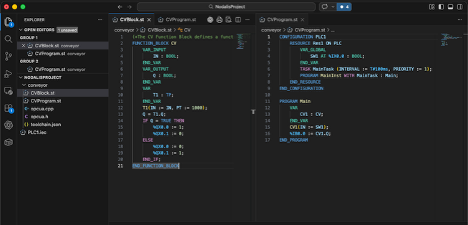
In this chapter, we will explain the process for developing a PLC resource using Structured Text files. This chapter (and all subsequent chapters) assume that you have a working knowledge of the IEC 61131-3 languages, especially Structured Text and Ladder Logic.
To begin, you will create or open a folder in which you will add ST files. You can right-click in the folder in the explorer panel and select the “Create ST File” menu item or run that same command from the command palette. In Figure 04 1, we have a ST project started under the “conveyor” folder. That folder contains two files: CVBlock.st and CVProgram.st. In CVBlock, wehave defined a function block called “CV”. In CVProgram, we have defined a program called “Main”. We’ve also specified a configuration, resource, task, and program instance.
You can develop any number of ST files within your project folder. These files can define programs or function blocks. You will need to create one ST file that contains a configuration with tasks and program instances if you want to run multiple programs. If you only want to run one program, you can just define that program in its own file.
Compiling Your Project
Once you’ve finished developing your project, you can compile the ST folder or file to a target. When compiling a file, right-click on the file in the Explorer panel and choose “Compile ST File” or run the “Compile ST File” command from the command palette. To compile all ST files in a folder, right-click on the folder and choose the “Compile ST Folder” run the same command from the command palette. Refer to chapter 3 to understand how to run these commands.
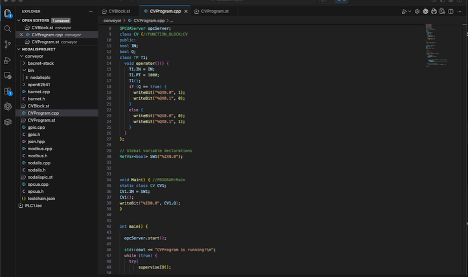
Figure 04 2 shows the results of a “Compile ST Folder” command on our conveyor folder. The target was “macos-arm64” and the output type was executable. Notice that the compiler combined the two ST files into a single “nodalisplc.st” file. It then transpiled that file into C++ source code in CVProgram.cpp and added the source files to support it. After preparing the source code, it ran the appropriate C++ compiler from the toolchain to compile the C++ source to an executable called “nodalisplc”, which it put in the “bin” folder under “conveyor”. The executable is a single-file executable that will run on any Mac OS platform with an Arm 64-bit architecture.