
Nodalis is a suite of tools intended to provide cross-platform, cross-language development for Programmable Logic Controllers (PLCs) using the IEC 61131-3 programming languages or the MTI Skipper Sheets programming method. There are three core elements of the Nodalis platform.
Nodalis Engine
The Nodalis Engine (the “Engine”) is a cross-platform library designed to provide consistency of behavior for PLC programming, regardless of what environment the PLC is running on. The Engine is not any one specific runtime, though. Depending on how the developer chooses to compile and deploy his or her PLC resource, the engine could be a C++ library incorporated into the compiled executable for the PLC or a Javascript module used with a NodeJS package. The Nodalis Engine currently supports the following compiled outputs.
· Native Executable – A PLC resource developed with Nodalis can be compiled to a native executable for one of the targets listed below. To accomplish this, the Nodalis Compiler transpiles the IEC language for the PLC resource into C++, includes the Nodalis engine C++ source code, and compiles the C++ code for the specified target. The result is a native executable that will run on the target.
· NodeJS Package – A PLC resource developed with Nodalis can be transpiled into Javascript and included in a NodeJS package that also includes a Javascript implementation of the Nodalis Engine. The NodeJS package can then be deployed to the specified target.
· JINT/Microsoft.Net Executable – A PLC resource can be transpiled into Javascript that will be used with a Microsoft.NET implementation of the Nodalis Engine (available through Nuget as “NodalisEngine”). The Nodalis Compiler will compile a single-file executable for the DotNet application that will load and execute the Javascript code from the PLC resource. This executable can then be deployed to the specified target.
· Arduino – A PLC resource can be transpiled to Arduino C++. The Nodalis Compiler will use the “Arduino-cli” tool to compile and program an Arduino target.
Any of the above output types can target the following platforms:
· Linux (Arm, Arm64, x64) – A PLC resource can be compiled as a native executable, NodeJS package, or DotNet executable that targets Linux in Arm 32 or 64 bit and Intel 64-bit architectures. This allows the developer to deploy to devices like the Rasberry Pi or other embedded systems, or develop a SoftPLC deployment.
· Windows (Arm64, x64) – A PLC resource can be compiled to native executable, NodeJS, or DotNet executable to target Windows on Arm or Intel 64-bit systems.
· Mac OS (Arm64, x64) – A PLC resource can be compiled to native executable, NodeJS, or DotNet executable to target Mac OS Arm or Intel 64-bit systems.
· Arduino – The PLC resource can be compiled and deployed to an Arduino device. When compiled for Arduino, the Nodalis Compiler transpiles the PLC resource to an Arduino INO file and then uses the Arduino-cli tool to compile and deploy it. Currently, the design reference for Nodalis targets the Arduino Opta device, but other targets can be supported, as long as they are network-based devices that support the ArduinoModbus library.
The Nodalis Engine provides a common set of communications protocols that a developer can use to integrate with IO Modules. The following protocols are supported by Nodalis Engine:
· Modbus-TCP – Nodalis implements a version of the Modbus protocol over TCP/IP for communications with IO Modules that support it.
· OPCUA – Nodalis supports the OPC/UA protocol for both client and server communications. It can communicate with devices that implement this standard, and it can also respond to clients that access its global variables through this standard.
· BACNET/IP – Nodalis can interface with client devices that implement the BACNET/IP protocol.
· GPIO - Nodalis can use onboard GPIO pins in the case of Linux and Arduino targets. Windows and Mac targets do not support GPIO.
Nodalis-Compiler
The second tool within the Nodalis framework is the Nodalis-Compiler npm package. This tool is the workhorse of the whole platform, as it serves as the compiler and programmer for all PLC resources and devices supported by this framework.
Nodalis-Compiler (the “Compiler”) is an npm package that runs on the NodeJS runtime. It is available at npmjs.com/package/nodalis-compiler. Note that NodeJS is a prerequisite for the compiler. You can download NodeJS from nodejs.org. You can globally install the compiler by running the following command from a terminal where NodeJS is available: “npm i -g nodalis-compiler”. This will make the compiler globally available to any terminal by executing the command “nodalis”.
The compiler is an open-source package licensed under Apache 2.0. The source code is available from https://github.com/montgomerytechal/nodalis-compiler/. Refer to the readme in the source repository for more information on the command line interface.
Nodalis IDE
The final tool within the Nodalis framework is the Nodalis IDE (Integrated Development Environment). Nodalis IDE is an extension available through Microsoft’s Visual Studio Code Code Editor (VS Code, as it is called colloquially). VS Code is a prerequisite for Nodalis IDE. You can get VS Code from https://code.visualstudio.com.
To install the Nodalis IDE extension in VS Code, open VS Code and select the Extensions panel on the left hand side of the window, or select the “View > Extensions” menu.
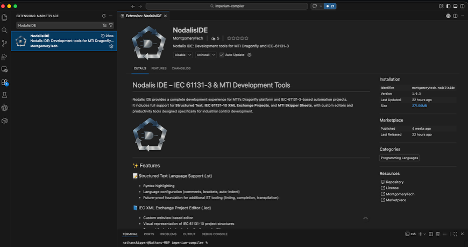
In the search bar for the extensions panel, enter the text “NodalisIDE”. This will display the NodalisIDE extension page. From there, you can click on the “Install” button to install the extension. Once you’ve installed the extension, you should notice that files with a “.st” or “.iec” file extension will have the Nodalis icon next to them.
The Nodalis IDE extension is also open source, licensed under Apache 2.0. The source code repository is available at https://montgomerytech.visualstudio.com/_git/mticode.